

Create a Carousel Ad from Scratch
Use Claude with the Meta Ads MCP to launch a carousel ad with 2-10 images. Showcase multiple products, features, or stories in a single swipeable ad.
Takes less than 2 minutes to set up
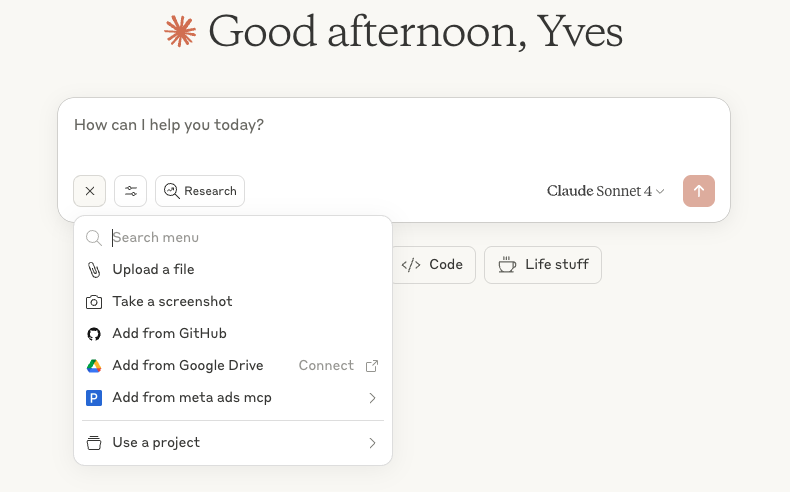
Access the Meta Ads MCP from Claude
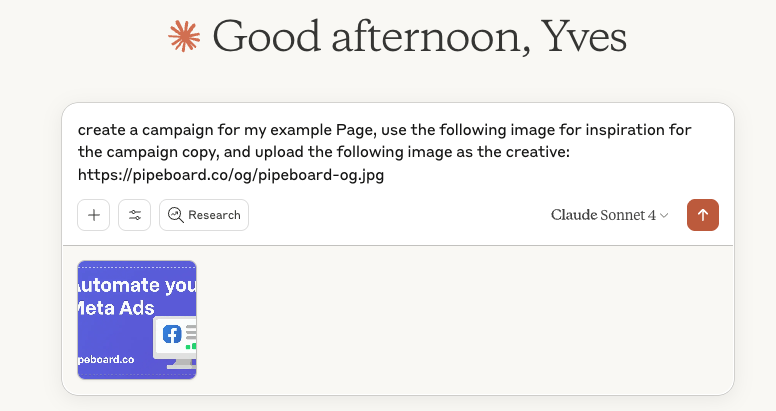
Prompt example with multiple uploaded images for analysis and URLs for the MCP
Important Limitation
Claude cannot upload image files directly to the Meta Ads MCP.
For each carousel card, you must use the MCP Upload command with a publicly accessible image URL. You'll need 2-10 URLs (one per card).
If you want Claude to analyze your images for copy ideas, manually upload them to Claude in the chat as well. In short: upload to Claude for analysis; provide URLs for the MCP creative.
What You'll Need
| Item | Description | Required |
|---|---|---|
| Ad Account | Meta Ads account ID (format: act_XXXXXXXXX) | |
| Facebook Page | Page associated with the account | |
| Image URLs | Direct links to images (2-10 images, one per card) | |
| Destination URLs | Landing page URLs for each card | |
| Headlines | Title for each card (Meta recommends ~40 characters) | |
| Primary Text | Message shown above the carousel | Optional |
| Descriptions | Additional text per card (Meta recommends ~20 characters) | Optional |
Step-by-Step
Prepare your creatives
- Upload the images to Claude if you want them analyzed for copy ideas.
- Get public URLs for all images (2-10). CDN or image hosting services work best.
- Make sure all images are the same aspect ratio (1:1 recommended).
Provide the images to the MCP
- Use the Upload command with each creative's public URL.
- The MCP will upload all images and return image hashes for each.
Configure each card
- Each card needs: a destination URL (required), headline (Meta recommends ~40 chars), and description (Meta recommends ~20 chars, optional).
- Cards can link to different pages, or all to the same landing page.
Add primary text and CTA
- Primary text appears above the carousel and applies to all cards.
- Choose a global CTA like SHOP_NOW, LEARN_MORE, BOOK_NOW, etc.
Polished Example Prompt
Create a Meta Ads carousel ad for my Facebook Page "My Store".

Use these images as the creatives (upload each to MCP by URL):
1. https://example.com/product1.jpg
2. https://example.com/product2.jpg
3. https://example.com/product3.jpg

Card details:
Card 1:
- Link: https://mystore.com/product1
- Headline: "Summer Collection"
- Description: "New arrivals"

Card 2:
- Link: https://mystore.com/product2
- Headline: "Best Seller"
- Description: "50% OFF"

Card 3:
- Link: https://mystore.com/product3
- Headline: "Limited Edition"
- Description: "Only 100 left"

Primary Text: "Discover our amazing products! Shop now and get free shipping on orders over $50."
Call-to-Action: SHOP_NOW

Deliverables:
- Create the campaign, ad set, and carousel ad ready for review.
- Name assets clearly and consistently.
- Confirm final structure and any budget or targeting defaults before publishing.
Image Specifications
Aspect Ratio
1:1 (square)
Minimum Size
600 × 600 pixels
Recommended Size
1080 × 1080 pixels
Formats
JPG, PNG, WEBP
Max File Size
30 MB per image
Number of Cards
2-10 cards
How to Get Image URLs
The MCP uploads images from URLs. You need to provide direct links to image files (ending in .jpg, .png, .webp, etc.).
Google Drive
- 1Upload image to Google Drive
- 2Right-click → Share → Anyone with link
- 3Copy the file ID from the URL
- 4Use format: https://drive.google.com/uc?export=view&id=YOUR_ID
Imgur (Free)
- 1Go to imgur.com
- 2Click "New Post" and upload
- 3Right-click image → Copy image address
- 4Example: https://i.imgur.com/abc123.jpg
Postimages (Free, no signup)
- 1Go to postimages.org
- 2Upload your image
- 3Copy the "Direct link"
- 4Example: https://i.postimg.cc/abc/image.jpg
Canva
- 1Create or open your design
- 2Download the image
- 3Upload to a hosting service above
- 4Use the direct link from that service
Valid URL Examples
https://example.com/images/product.jpghttps://cdn.site.com/banner.pnghttps://i.imgur.com/abc123.webpInvalid URL Examples
https://example.com/product-page(not a direct image link)https://canva.com/design/abc123(Canva page, not image)Call-to-Action Options
SHOP_NOWE-commerce, product salesLEARN_MOREInformation, servicesBOOK_NOWReservations, appointmentsDOWNLOADApps, materialsGET_QUOTEQuotes, estimatesSUBSCRIBENewsletters, subscriptionsWATCH_MOREVideos, contentPro Tips
First Card is Crucial
Most users only see the first card. Make it your best one!
Visual Consistency
Use the same style, colors, and aspect ratio across all cards.
Auto-Optimization
Meta can automatically reorder cards to improve performance. Enable this option for better results.
Mobile-First
Most users see carousels on mobile. Test your images on a phone screen.
Let Claude help with copy
Upload your product images directly to Claude to get AI-generated headlines and descriptions for each card. Claude can analyze the images and suggest compelling copy, but remember: you still need to provide public image URLs to the MCP for the actual creative upload.
Related Guides
Continue learning with these recommended guides.