

Fix Meta Ads Error #3858385
“Please authenticate your account”
Meta has temporarily blocked ad creation and editing on your account as a security precaution. Your existing ads are still running. Here is how to lift the restriction in under 5 minutes.
What the error looks like
OAuthException · code 31 · error_subcode 3858385
Please authenticate your account
We think someone may have tried to access your account without permission. For your protection, you won't be able to create or modify ads until you authenticate your account in Ads Manager. Your existing ads will continue to run normally.
This error appears when using the Meta Ads API, automation tools, or AI assistants — any write operation (creating campaigns, adsets, or ads) will fail until you complete the re-authentication in Ads Manager.
How to fix it — step by step
Open Meta Ads Manager
Go to adsmanager.facebook.com and navigate to the ad account that is throwing the error.
Click to edit any adset or ad
Open any existing campaign, then click to edit one of its adsets or ads. You do not need to actually change anything — just opening the edit view is enough to trigger the verification panel.
Find the "Verifying your changes" panel
On the right side of the edit screen, look for a panel titled "Verifying your changes." It will display the message from Meta and a blue "Start authentication" button.
Click "Start authentication" and complete verification
Follow the on-screen steps. Meta may ask you to confirm your identity via email, phone, or another method. Complete the flow until you see a confirmation.
Return and retry
Once authenticated, go back to whatever you were doing (creating or editing ads, running API calls, etc.) and try again. The error should be gone.
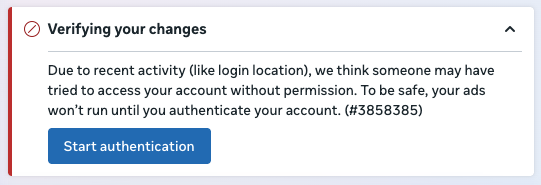
This panel appears on the right side of the ad edit screen when you open any adset or ad for editing. Click Start authentication and follow the steps Meta presents.
What if the “Start authentication” button never appears?
This is common. Many users report that no matter what they try — editing ads, switching browsers, clearing cache, trying incognito mode — the “Verifying your changes” panel and the “Start authentication” button simply do not show up in Ads Manager.
When the authentication prompt does not appear, there is unfortunately no way to manually trigger it. But the restriction typically clears on its own within 2–5 days. During that time:
- • Existing ads continue to deliver
- • Reading insights and reports
- • Viewing campaigns, ad sets, and ads
- • Checking audience and creative details
- • Creating new campaigns, ad sets, or ads
- • Editing existing campaigns or ads
- • Duplicating ads
- • Changing budgets, targeting, or bids
Things to try while you wait
- Log in to Ads Manager daily — some users find the authentication prompt appears on a subsequent visit, even if it was missing initially.
- Try a different browser or device — the prompt may be blocked by a browser extension or specific browser state.
- Check Business Settings — go to Business Settings → Security Center in Meta Business Suite and look for any pending security tasks.
- Contact Meta Business Support — if the error persists beyond 5 days, contact Meta directly. They can sometimes lift the restriction from their side.
Why this happens
Meta's security systems monitor account access patterns. The most common trigger is simply accessing the account from more than one place — for example, your usual browser plus an API client or AI assistant. Other routine signals (a new login location, an unfamiliar device, or a VPN) can prompt the same check. None of these indicate a breach — it is just a precautionary re-authentication step.
This is not a punishment or a sign that something is permanently wrong with your account. It is a security gate. Once you confirm your identity through Ads Manager, the restriction is lifted immediately.
Common triggers include:
- Connecting a new AI tool or MCP server to your Meta Ads account
- Accessing your account from a new IP address or VPN
- A burst of API write operations (creating multiple ads rapidly)
- Logging in from a new device or browser
- Changes to your account security settings or two-factor authentication
- The user has no role assigned in the Business Manager — Meta Support has confirmed that this error can appear when the user making API calls does not have an assigned role in the business that owns the ad account. This is easy to overlook because it looks like a security hold, not a permissions issue. Check Business Settings → People and assign the user an appropriate role.
The block applies only to creating and modifying ads. Any campaigns, adsets, and ads that were already running before the block will continue to deliver without interruption.
Frequently asked questions
Will my existing ads stop running while this error is active?
No. Meta explicitly states in the error message: "Your existing ads will continue to run normally." The block only prevents you from creating or modifying ads until you re-authenticate.
Does this mean something is wrong with my account?
Almost always no. The most common cause is simply accessing the account from more than one place — for example, your usual browser plus an API client or AI assistant — which Meta flags automatically. It is a routine precautionary check, not a sign of a breach. Complete the verification to lift the restriction.
Why does this happen when using the Meta Ads API or an AI tool?
API calls (including those made by AI assistants, MCP servers, or automation tools) are subject to the same security checks as the Ads Manager UI. When Meta flags your account, all write operations — whether from the UI or the API — are blocked until you authenticate in Ads Manager.
The authentication popup does not appear at all. What do I do?
In some cases, no matter what you try — editing ads, switching browsers, clearing cache — the "Verifying your changes" panel and the "Start authentication" button simply do not appear in Ads Manager. When this happens, there is no way to manually trigger the verification. The good news is that the Terms of Service error typically resolves on its own after 2–3 days. During that time your existing ads continue to run; you just cannot create or edit campaigns. If the error persists beyond a few days, contact Meta Business Support.
I completed verification but the error is still happening. What now?
Wait a few minutes and try again — authentication can take a moment to propagate. If it persists, try logging out of Meta Business Manager and back in, then repeat the edit-an-ad step to check for any remaining verification prompts. In rare cases the restriction lifts on its own after 2–3 days even without completing verification.
Could this be a permissions issue rather than a security hold?
Yes. Meta Support has confirmed that error 3858385 can appear when the user does not have a role assigned in the Business Manager that owns the ad account. It may also be that the business owner or admin is the one who needs to complete the authentication step in Ads Manager to clear the hold for the entire account. Check Business Settings → People to make sure the affected user has an appropriate role, and ask the business admin to log into Ads Manager and look for authentication prompts. We have seen this cause in practice — do not skip this check.
Can I prevent this from happening in the future?
There is no guaranteed way to prevent it, but it is less likely to trigger if you access your account consistently from the same location and device. Using a VPN when accessing the API or Ads Manager can increase the frequency of these checks.
Pipeboard makes Meta Ads errors actionable
When you hit error 3858385 through Pipeboard's Meta Ads MCP server, you get a plain-English explanation and exact steps to fix it — instead of a raw API error code. Pipeboard connects Claude, ChatGPT, and other AI assistants to your Meta Ads account so you can manage campaigns through natural conversation.